
Euristo™, the maieutic tutor
The tutor that doesn't give the answer. It helps the student find it.
“Bringing knowledge to birth through questioning — like Socrates.”
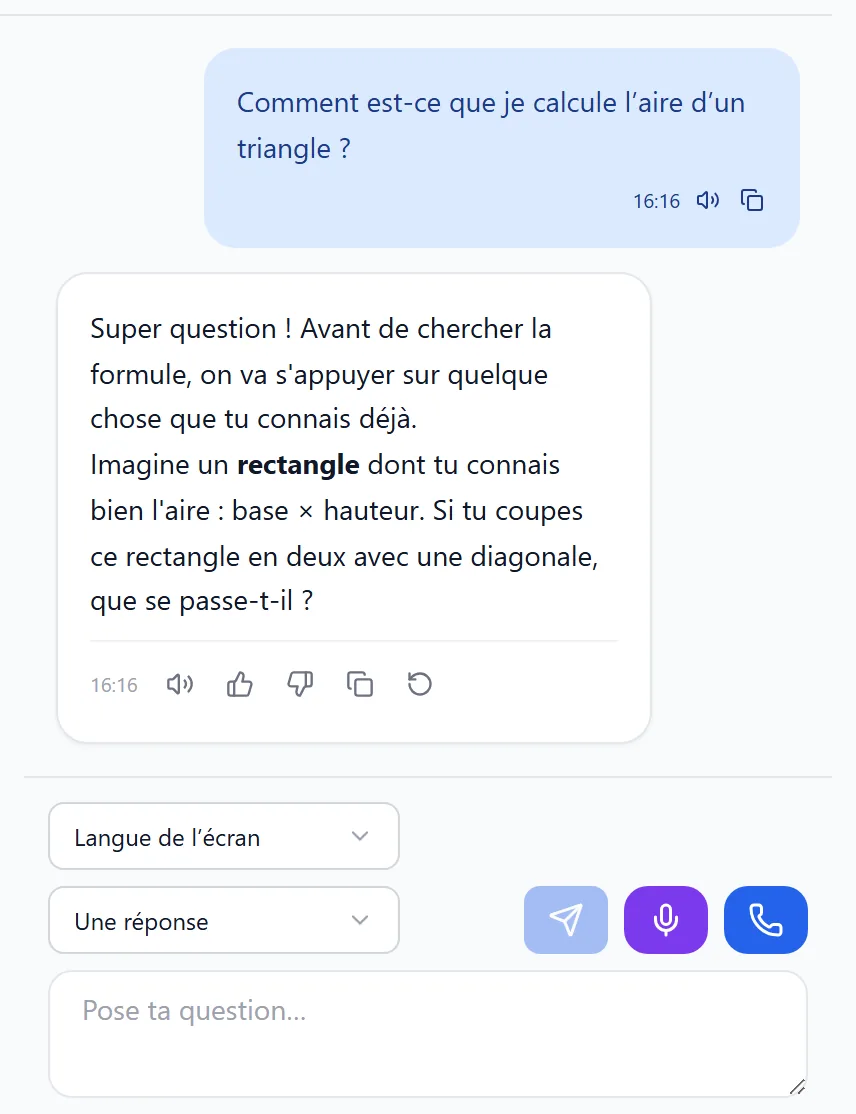
Example — maths, age 12
StudentWhat is 3/4 + 1/2?
EuristoBefore adding them, what do these two fractions need to have in common?
StudentThe same number at the bottom?
EuristoExactly, the same denominator. How would you write 1/2 with a 4 at the bottom?
Student2/4! So 3/4 + 2/4 = 5/4.
EuristoWell done, you found it yourself. Is 5/4 more or less than one whole?
What Euristo changes
Euristo comes from the Greek heuriskō, “I find” — the root of “eureka”. Maieutics is Socrates' method: asking the right questions so that students build their own answer, and remember it.
A general-purpose AI assistant
- gives a ready-made answer that the student copies;
- doesn't know what school level it is talking to;
- ignores the curriculum and the class's own lessons;
- is not designed for children, nor supervised by the school.
Euristo
- asks questions, gives hints, and lets the student find the answer;
- adapts its questions to the student's year group;
- draws on the official curriculum and the lessons uploaded by the school;
- is supervised by the school or the family, with a dedicated safety guard.
What the tutor can do
One tutor, in writing and by voice, that supports students through their lessons and exercises.
Ask questions
Short questions and step-by-step hints, never a solution to copy.
Adapt to the level
Vocabulary, examples and the size of each step follow the student's year group.
Talk
A real-time voice conversation, to revise out loud.
Draw
Animated diagrams to explain, checked before the student sees them.
Read a photographed lesson
The student takes a picture of their lesson: the tutor works from what the lesson actually says.
Follow the school's lessons
Documents uploaded by the school and its teachers inform the answers.
Quizzes and exercises
Exercises and quizzes prepared for the class, checked by the server.
17 languages
Including Arabic and Tunisian, with right-to-left writing.
French, English, Arabic, Tunisian, German, Swiss German, Swiss French, Dutch, Italian, Spanish, Portuguese, Russian, Norwegian, Swedish, Danish, Finnish, Chinese.
Children's safety first
A tutor for minors must do more than be polite: it is supervised, and what it knows about a child is protected.
A dedicated guard
A safety model reads what the student writes before any answer, then the answer before it is shown. When in doubt, it refuses.
Distress is never ignored
When there is a sign of distress, the help message stays on screen with the country's official helplines, and the designated adults are alerted.
The student's name never reaches the model
Names are replaced by tokens before every call to the artificial intelligence; people's texts are encrypted in the database.
In Europe or on your premises, with no advertising
Designed for the GDPR: hosted in Europe, or installed at the school, even with no Internet. No advertising, no selling of data, and conversations are not used to train models.
For schools
School leaders stay in control of everything: the curriculum, accounts, the AI models allowed and the budget.
The country
You choose the official curriculum: France, Belgium (Wallonia-Brussels Federation) or Tunisia.
The classes
Taken from the curriculum, created in one click.
The programme
Prepared automatically, then approved by you, line by line.
The accounts
Teachers, students and parents, linked to their classes.
Teachers
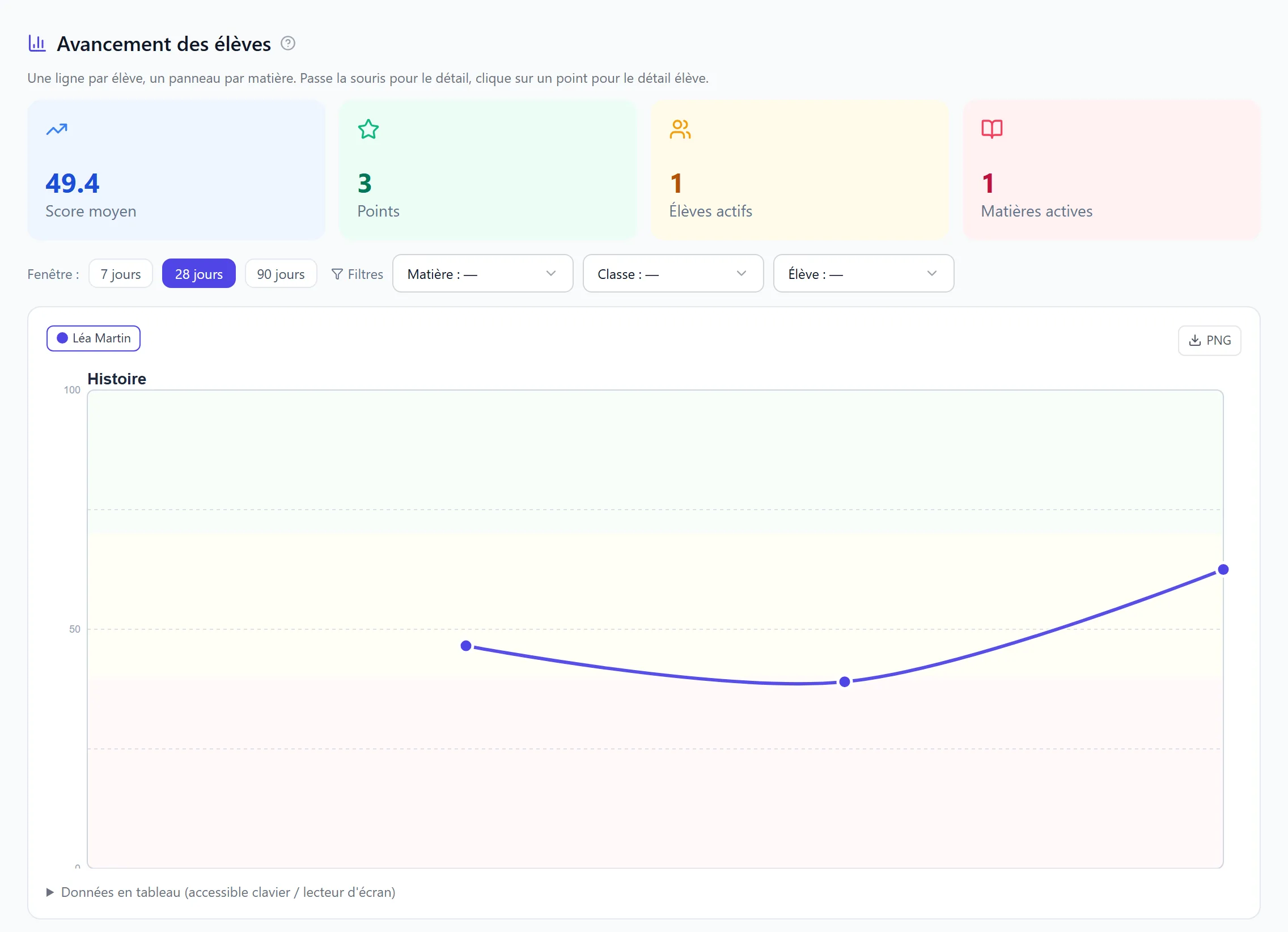
Lessons, quizzes and exercises prepared for their classes; progress tracked by student and by subject.
Oversight
Choice of allowed AI models, budgets per school, class or student that are actually enforced, usage statistics.
Alerts
Everyone receives what concerns them: leaders for the school, teachers for their classes, parents for their child.
Online or on premises
Available online, or installed on a school server — even with no Internet connection at all: the AI models and the safety guard then run on site (a graphics card is required).
Tailored AI assistants, with Phylova
Fractal orchestration of AI agents: Phylova organises your AI agents into hierarchical teams. With Phylova, the school builds its own AI assistants — small teams of specialised agents that a teacher puts together in the Studio and makes available to the class, without writing code.
For the teacher
An assistant designed once in the Studio — for example “prepare a revision sheet and a quiz on this chapter” — and then shared with the class.
For the pupil
They open the assistant from Euristo, type (or dictate) their request, and get the result: an explanation, a quiz, a document, a diagram. The steps run on their own.
Examples, possible today
- A role-play: the student practises with a character played by the AI — a customer, a historical witness, an oral examiner — within a setting fixed by the teacher, then gets feedback on their performance.
- A research project: the assistant searches the web for sources, keeps a selection and helps the student build a structured report, delivered as a PDF.
- Preparing a science experiment: the protocol, the table of measurements with its chart, and the diagram of the set-up, based on the chapter.
- A presentation: from the class documents, the student builds the outline and then the slides they will present, with the assistant.
- Code review for older students: the student submits their program, the assistant explains what it does, points out errors and suggests leads, without giving the solution.
- Questions and answers on the course documents uploaded by the school and its teachers.
- Validation by the teacher before a result is handed out (a human in the loop).
Each assistant stays in its role
It can only use the agents and tools the teacher placed in the workflow.
Isolated data
Each school is a separate organisation: its data, workflows and history stay its own.
Pupils only share what they type
Only a pseudonymous identifier is sent with their request, never their name.
Local AI models by default
Requests are not sent to an outside provider unless the school allows it.
The head teacher stays in control
They choose which groups may use Phylova from Euristo, and access follows the school's subscription.
One account
Teachers and school leaders open the Phylova Studio with their Euristo account.
Discover Phylova Phylova is an option of the school's licence.
For families
A household can use Euristo even if the school has not adopted it.
An account for the child
The parent creates their child's account and supports them as they revise.
Follow without spying
The parent sees what their child is working on and receives an alert when needed.
A clear framework
A budget set by the household, the same tutor that helps them find the answer, and the same safety guard as at school.
Under the hood
Proven, open building blocks, put together so that a failure never goes unnoticed — and no answer reaches a child without being checked.
Hosted in Europe, or at your school
Hosting in Europe, or installation on a server at the school: what is proven with us is exactly what will run for schools.
A solid foundation
Open, well-established software, kept up to date with its security fixes; sign-in and keys are kept separately.
A choice of models
Open models on our own graphics cards, or online models hosted in Europe. The school chooses which ones it allows; never a silent switch to another.
Answers that arrive as they are written
The answer appears while it is being written. A dropped connection cancels nothing: the turn completes, it is saved, and the student finds it on return.
Nothing fails silently
Continuous monitoring and alerts. A check that cannot answer (safety, budget, licence) refuses the turn rather than letting it through, and says so.
Checked before every update
Student, teacher and parent journeys are replayed automatically, in a real browser, before every update.
Frequently asked questions
What technologies is Euristo built on?
On open, well-established software, and open AI models or models hosted in Europe. The essentials are in Under the hood; the technical details are provided to any school that asks, for its tender or its data protection officer.
Does Euristo ever give the answer?
Its job is to help the student find it: it asks questions and gives increasingly precise hints. Once the student has found it, it confirms and helps them check their reasoning.
Who can see my child's conversations?
Only the student reads the text of their exchanges with the tutor. Their teachers, school leaders and parents see what they worked on — the topics covered and a short summary — never the exchanges themselves. If the student reports an answer, it is the student who passes it on; at a sign of distress, the designated adults are alerted, without the content. Each school is walled off from the others.
Is the data used to train an artificial intelligence?
No. Conversations are not used to train models, the student's name is never sent to the model, and texts are encrypted.
Can it be installed at the school, without Internet?
Yes. Euristo can be installed on a school server and run entirely offline: the AI models, the safety guard and the accounts stay on site, and no data leaves the school. It needs a server with a graphics card; we help you size it.
How much will it cost?
Prices, for schools and for families, will be announced at launch.
When will Euristo be available?
Euristo is getting ready to welcome its first pilot schools. Write to us to take part or to be told when we launch.
Join the first pilot schools
School leaders, teachers, parents: write to us, we will answer you personally.
contact@euristo.com